
Ambiera ForumDiscussions, Help and Support. |
|
| [ 1 2 ] Page 1 of 2 |
|
|||||
|
Inspired by jaimezegpi radar script, I've just developed a new script to let the player follow the main character. I've attached an example to know how to use. I'll post a detailed explanation for the script concept tomorrow or after tomorrow at maximum. Here are the download link for the script: http://www.techno-valley.com/amb... And here is the The example .ccb file http://www.techno-valley.com/amb... |
||||
|
Nice, thanks! |
||||
|
Download link is not working for me...???? |
||||
|
Sorry, I've fixed the download link |
||||
|
Yo!!! Nice work... @techno-valley  It will be more awesome if we can limit the movement to map... As everybody can notice if the player moves far away from the plane mesh you have used in ur example... We ca see the map character will leave the red map area and starts moving on the game screen... If you can somehow limit the map character to map area only... |
||||
|
I'm glad you like the script. Regarding the limitation for the character position on map can be done using few if conditions (will check it later tonight) But, usually this is always done within the scene so you add a fence around the scene (either visible or non-visible) and this will automatically block the character from going outside the on-screen map. 
|
||||
|
Ummm ... or is it posible to create a gtaike radar.. |
||||
|
A little bit complicated  You mean a zoom on a specific area and moving in parallel to the main character movements ? this will depend on the scene width and height it will be changeable. BTW, I've just seen your GTA game like demo :) very nice screens and the game play is not bad however, the melee weapons and fight still need some improvement I guess but any way a nice trial .. very good job for doing it :) the link below is very useful http://gta.wikia.com/wiki/Radar |
||||
|
I want to show the whole vice city map.with 20x20 radar width and 200x200 screen width.... and you can.say that I.want to.move the character on a 3d ball.with gta map on it... |
||||
|
techno-valley NIIIIIIICE Behavior...!! thanks for share mmm... GTA Map.... sound intresting.... sound like matrix maths.. |
||||
|
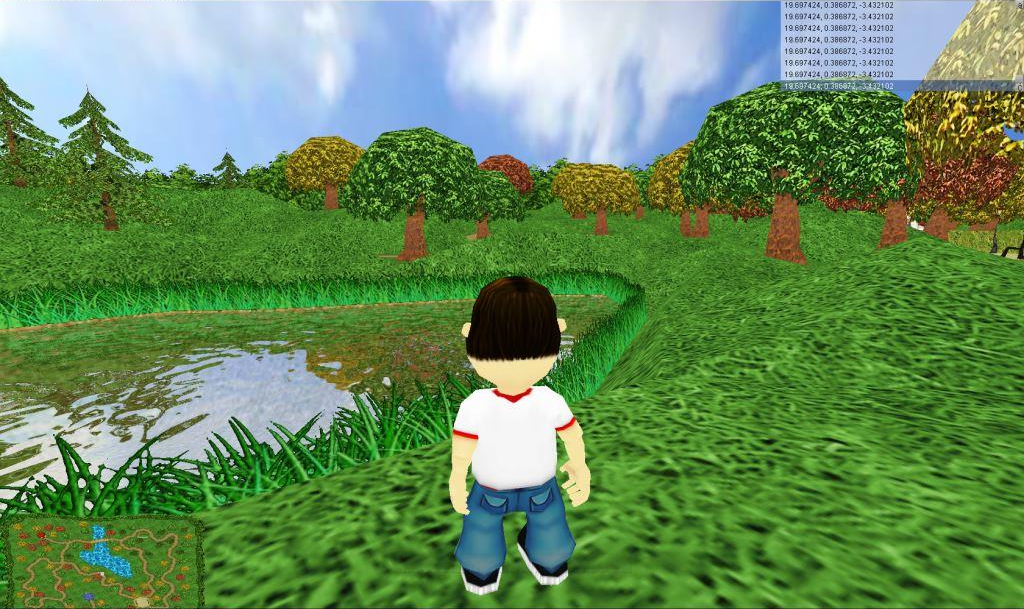
@jaimezegpi Thanks @just_in_case I didn't have time to modify the script yet. I'm posting a screenshot for letters kingdom game with the map and I'm still figuring out some problems in the script. I'll get back to you soon. as you can see the map is at the left bottom of the screen. To have an image for your scene just add a new camera perpendicular on your scene and run your game and have a screen shot modify and add to your scene as explained in the script. |
||||
|
I've just created a small doc explaining how the script works Welcome of course for any enhancements and idea for the script and the doc as well. http://www.techno-valley.com/Cha... |
||||
|
I'm wondering if someone has tested this behaviour. Also if Niko or our programmer gurus can enhance it for future :) |
||||
|
When i try to add a minimap image, it says me: could not open file of texture. How to write correct path? |
||||
|
Hello User, If you checked the attached PDF, you may have found the line below.
In this example you put the map file here named map-new.png in the same location as the .ccb in order to use a full path for example you can replace the filename with the full path C:\\Paht\\to\\mapfile\\map-file.png where the path is actually C:\Path\to\mapfile Folder and the file name is map-file.png you can also use any other supported extension of course |
||||
| [ 1 2 ] Page 1 of 2 |
|
|




)